

How to create custom strats
A short, step-by-step guide to building your own strategies.1
Create New Strategy
On strats tab, tap
"Create New Strategy" button;2
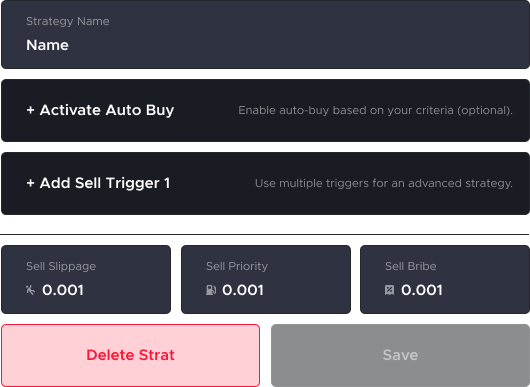
Strategy Name
Enter a strategy name;
3
Basic Parameters
Set basic parameters;
| Buy/Sell Slippage | Defines how much price movement you allow during a trade. | Higher slippage increases the chance your order fills, but at a worse price. |
|---|---|---|
| Buy/Sell Priority | Controls how fast your transaction tries to go through. | Higher priority means faster confirmation but usually higher fees. |
| Buy/Sell Bribe | An optional extra fee paid to validators to push your transaction ahead of others. | Helps your order fill faster in congested markets. |
| MEV Protection | Reduces the risk of bots manipulating your trade before it confirms. | It helps prevent front-running, sandwich attacks, and other MEV tactics that can worsen your entry or exit price. |
4
Buy Parameters
Set buying parameters;
| Min Market Cap | The lowest market cap a token must have for your strategy to buy it. | Helps you avoid extremely small or risky tokens. |
|---|---|---|
| Max Market Cap | The highest market cap a token can have for your strategy to buy it. | Useful for targeting early plays and avoiding large, slower-moving tokens. |
5
Sell Parameters
Set selling parameters;
| Stop Loss | Automatically sells your position if the price drops to a set percentage. | Helps limit your losses. |
|---|---|---|
| Take Profit | Automatically sells your position when the price reaches a target gain. | Locks in profits without needing to monitor the chart. |
Setting multiple Take Profit levels lets you scale out gradually, locking in profits while still riding potential upside.
6
Advanced Sell Parameters
You can also activate Trail Stop for an advance strategy;
| Activate At (%) | Price to Change (-%) | Amount to Sell (%) |
|---|---|---|
| The percentage gain where the trailing stop system turns on. After this level is reached, the strat starts watching for pullbacks. | How much the price must pull back from the top for the sell to trigger. This defines the pullback level that activates a partial or full exit. | How much of your position to sell when that pullback level is hit. Useful for scaling out in steps as the price retraces. |
You can set multiple Trail Stop levels to secure profits gradually as the price pulls back.
7
Save Strategy
Tap
"Save" button to save and set strategy, or "Delete" to start over.